What finance needs to know about MCP: expense tools let AI in, accounting tools mostly don't
The AI creates cards only after finance says yes.
For my post about HR I read the MCP documentation of 20 HR, recruiting and performance systems. The obvious next question: what does this look like in finance?
So I did the same for 12 accounting and expense tools: DATEV, sevDesk, Lexware Office, BuchhaltungsButler, Candis and Xero for accounting, and Pleo, Moss, Spendesk, Circula, Qonto and Payhawk for expenses and company cards. I read their documentation, help centres, developer portals and pricing pages as of 27 October 2026.
Short version: the expense tools have opened up to AI: 5 of 6 have their own AI access. In accounting it's only one of six, Xero. The five German tools have none. And as in HR, this isn't only about reading. Some of these connections let the AI send invoices, change suppliers or create cards.
A quick reminder: what MCP is
MCP (Model Context Protocol) is a standard plug between AI assistants like Claude, ChatGPT or Copilot and the rest of your software. Each connected tool publishes a list of actions through it, like "list open invoices" or "categorise an expense", and the AI picks from that list when you ask it something. When the vendor runs this plug itself (the technical terms are MCP server or connector), I call it the tool's own AI access.
Half of the tools have no AI access of their own
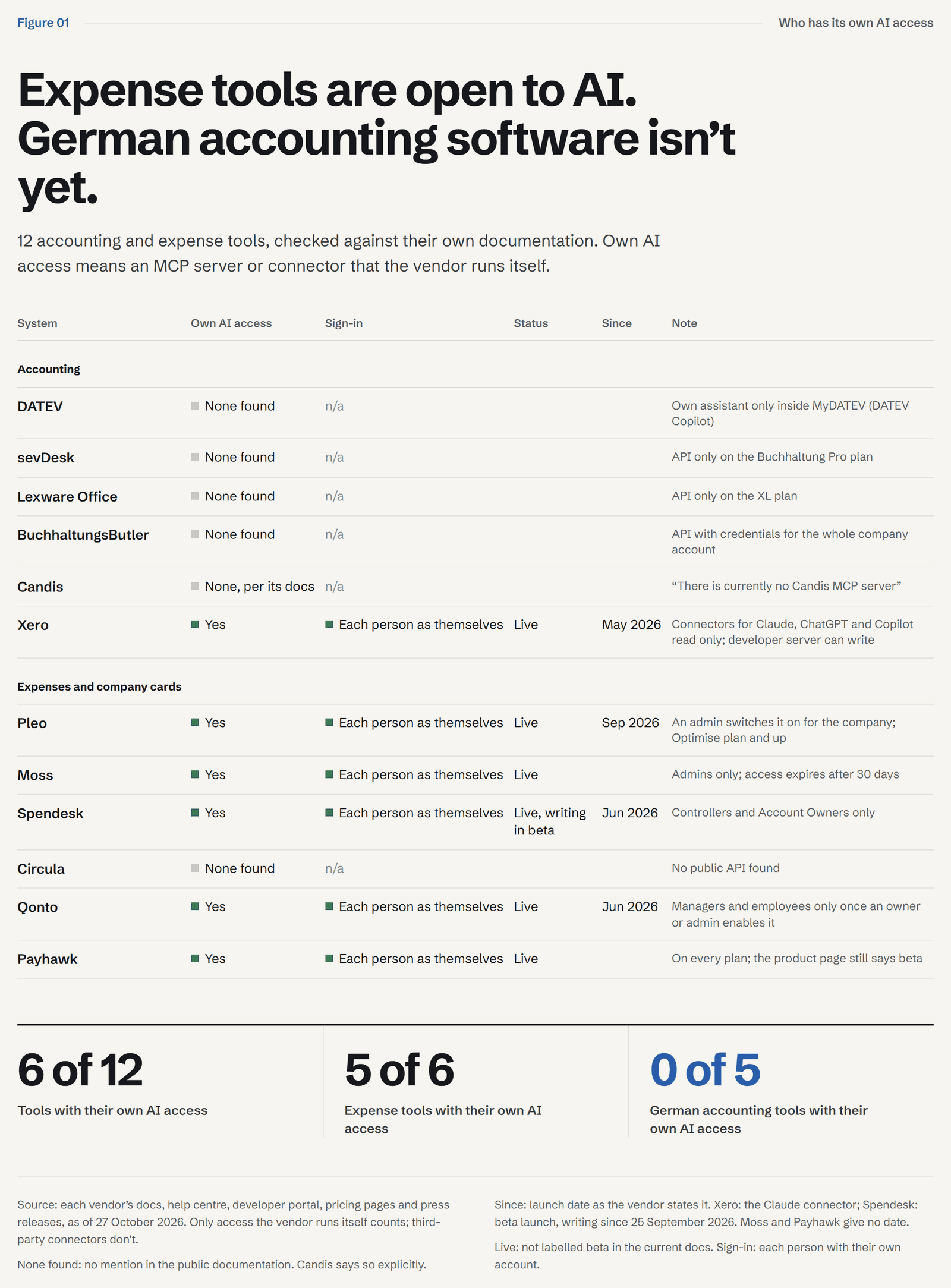
6 of the 12 tools have their own AI access, and the split falls almost exactly between expense tools and accounting software.
For expenses and company cards it's 5 of 6. Qonto has had it since June 2026. Spendesk launched a beta in June and since late September also lets the AI change things, again as a beta. Pleo has been live since September, and Moss and Payhawk give no date. Circula is the only one where I found neither AI access nor a public API.
In accounting, only Xero has one. Xero has connectors for Claude, ChatGPT and Microsoft 365 Copilot, all three read only. DATEV, sevDesk, Lexware Office, BuchhaltungsButler and Candis have none. DATEV has its own assistant for tax firms, DATEV Copilot, but it only works inside MyDATEV. Candis says so outright in its developer docs: "There is currently no Candis MCP server". For the others I simply found none in their documentation.
Where a tool has its own AI access, each person signs in with their own account, just like with the HR tools. So the AI sees what that person is allowed to see anyway. What differs a lot is who may connect at all. At Moss only admins, and access expires automatically after 30 days. At Spendesk only the Controller and Account Owner roles; admins can set up the connection but can't use it themselves. At Qonto the Owner, Admin and Accountant roles can connect right away, managers and employees only once an owner or admin enables access for them. At Pleo an admin switches access on for the whole company, and it can't yet be limited to specific people.
Every vendor drew the line somewhere else
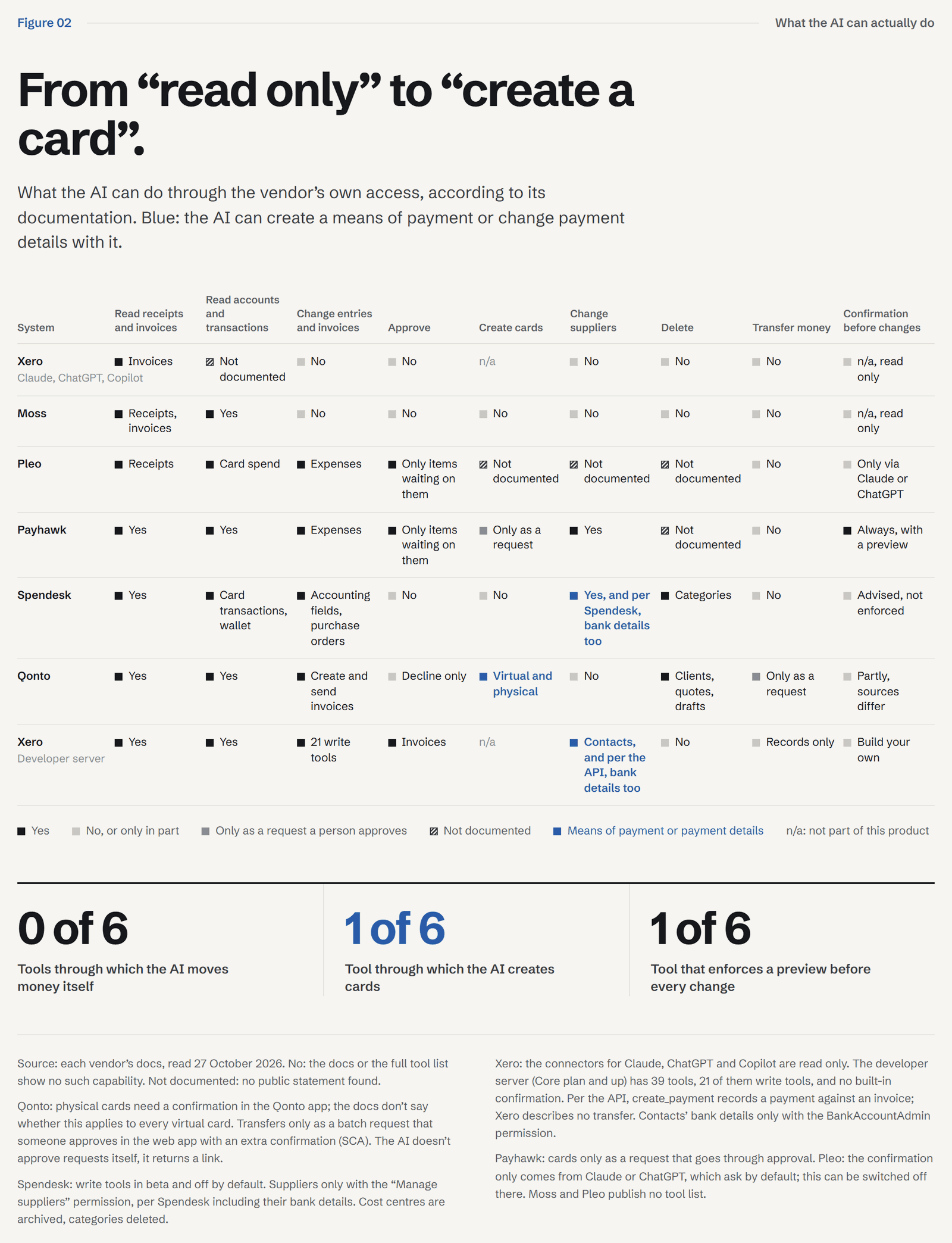
As with HR, the more interesting question is what the AI is allowed to do once it's in. And here, too, the answers are far apart.
At the careful end are Moss and Xero. Moss writes: "Your assistant can look up data, but cannot create, edit, or delete anything in Moss." And Xero on its Claude connector: "Claude can’t create, edit, approve, reconcile or pay in Xero."
Pleo lets the AI change expenses, such as categories, tags or receipts, and approve or reject expenses waiting for approval by the person who connected the AI. Payments and company settings stay out. Payhawk goes further with 82 tools: approving expenses, freezing cards, managing suppliers and purchase orders. To balance that, Payhawk shows a preview before every change: "Every change shows a preview first and waits for your explicit confirmation."
Spendesk has 66 tools, 29 of which change something, even deleting expense categories. These write tools are off by default in two places, though: an admin has to allow them for the connection, and each person has to tick them again when connecting. Qonto lets the AI create and send invoices, delete drafts, invite employees and create cards. And alongside its read-only connectors for Claude, ChatGPT and Copilot, Xero has a server for developers with 21 write tools, which can, for example, approve and void invoices. It has no built-in confirmation. Xero advises: "Build a confirmation step into your agent before it calls them."
None of the six vendors lets the AI transfer money itself. With Qonto, the AI can only prepare transfers as a batch request, which someone then approves in the Qonto web app with an extra confirmation, and Payhawk writes: "The Payhawk MCP never starts a payment or a transfer."
The catch: the AI that reads a supplier invoice can also create a card
The HR post was about Simon Willison's "lethal trifecta": access to private data, exposure to text written by strangers, and a way to send things out. An AI that has all three can be talked into handing data over. The same goes when, instead of sending, it can act.
In finance, the second one is part of everyday work. Every supplier invoice, every receipt and every email from a supplier is text that someone outside your company wrote. An AI connected to your inbox or to Moss reads those invoices. If the same AI is also connected to Qonto, it can create cards. Qonto itself gives an example in its docs: "Create a virtual card called ‘Subscriptions’ with a €200 monthly limit, restricted to online payments." If an invoice contains a hidden instruction, the AI reads it like everything else.
This isn't a flaw in Qonto. Qonto has even built in brakes. The AI can only do what the role of the person who connected it allows. Physical cards have to be confirmed by someone in the Qonto app. For virtual cards, the docs aren't clear: the help centre says issuing a card "requires your approval first", while the technical docs only mention a confirmation in the app for "some card creations". Whether every virtual card has to be confirmed in the app isn't stated anywhere.
Another brake sits in the assistant: by default, Claude asks before every action. That helps right up until someone clicks "Always allow". Invariant Labs noted in the GitHub case that many users do exactly that.
At Spendesk, the risk is less visible. With the write permission "Manage suppliers", which is off by default, the AI can change suppliers, according to Spendesk "including its bank details". Spendesk instructs the AI to only set bank details that you gave exactly and confirmed, but says itself that this is "an instruction to the assistant, not a lock". An email saying "our bank details have changed" is a well-known fraud trick. If the same AI also reads your inbox, exactly that kind of email meets a tool that is allowed to change suppliers. Xero's developer server is similar: with the right permission, it also changes the bank details of contacts.
None of these cases is a bug. It's the combination of reading and acting in one assistant, and no single vendor can solve it for you, because none of them sees what else is connected.
When a tool has no AI access of its own, the connector decides
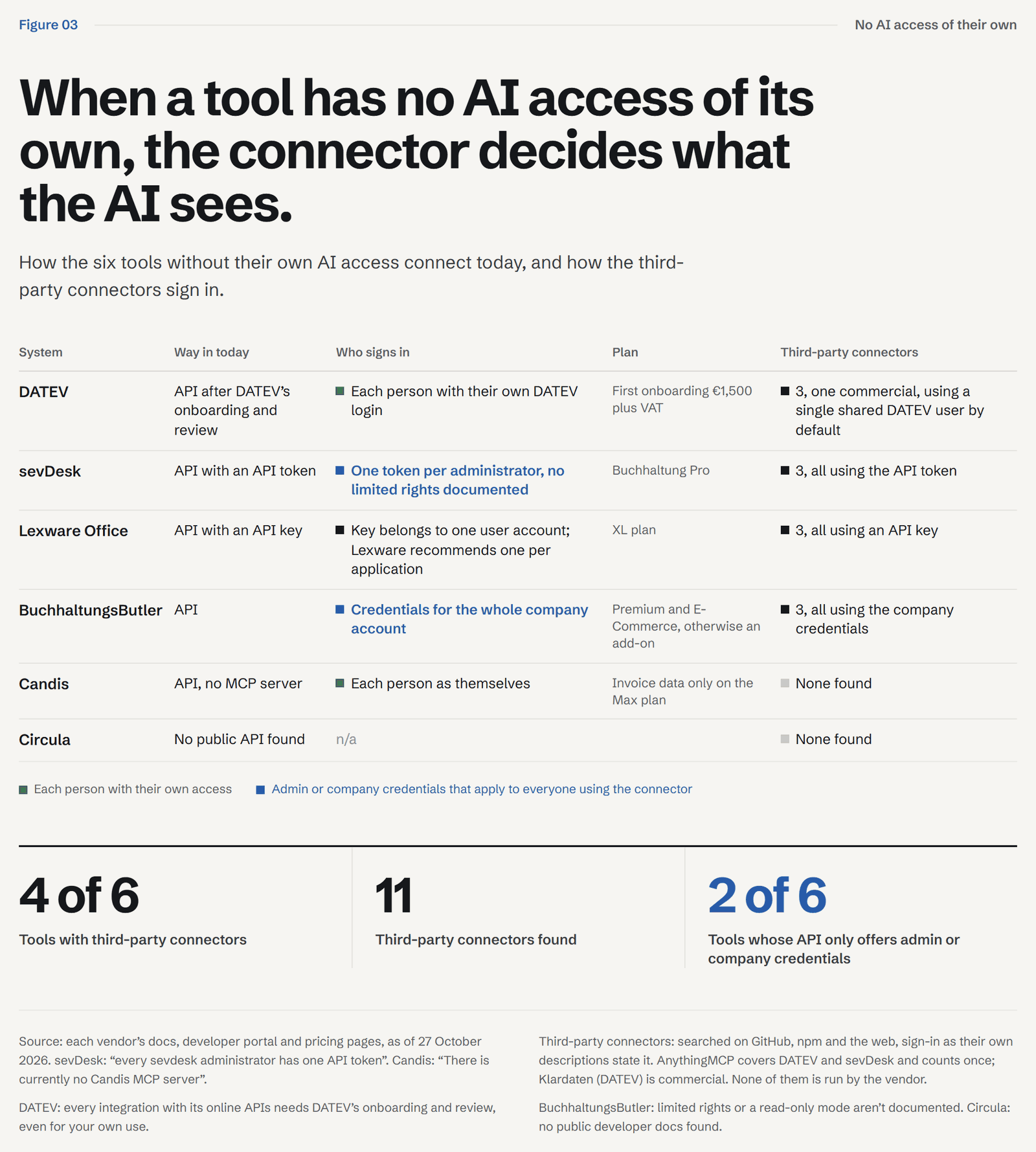
For the six tools without their own AI access, the API is usually what's left, and third-party connectors, mostly open-source projects on GitHub, have grown around it. For DATEV, sevDesk, Lexware Office and BuchhaltungsButler I found three each, for Candis and Circula none. How such a connector signs in decides what the AI sees.
At sevDesk the API only comes with the Buchhaltung Pro plan, and according to its docs "every sevdesk administrator has one API token". There's no documented way to limit that token. So a connector with that token sees what the admin sees, for every person who uses it. BuchhaltungsButler works with credentials for the whole company account, with no per-person sign-in and no documented read-only mode. At Lexware Office each API key belongs to one user account, but Lexware recommends one key per application, not per person. The API is only on the XL plan.
DATEV goes the other way with its online APIs. There each person signs in with their own DATEV login, and every integration first goes through DATEV's onboarding and approval, even for your own use. The first onboarding costs €1,500 plus VAT. That takes effort, but it means DATEV checks every integration before it reaches real data. One of the three connectors, a commercial product, goes through DATEV's local interface and uses a single shared DATEV user for all connections by default.
With Candis each person signs in individually, but there's no MCP server, and its invoice data API is only on the Max plan. For Circula I found no public API.
That fits the Astrix analysis from the HR post: where the vendor doesn't build its own access, the AI often works with fixed, long-lived credentials. With sevDesk and BuchhaltungsButler, they then apply to everyone who uses the connector.
What to ask before you switch on AI access
If you're about to switch on one of these connections, these are the questions I'd ask:
- Who can connect, and as whom? Each person with their own account, or does everything run on one admin's credentials?
- Can the AI create cards or set up transfers? And who has to confirm it, and where?
- Can it change suppliers or bank details?
- Does the same AI read text from outside, like invoices, receipts or emails? That's exactly where reading meets acting.
- Is "Always allow" permitted in your company, and who notices when someone turns it on?
- Can you see afterwards what the AI looked at and what it changed?
These are the questions I'm building Vortner for. It sits between your AI and your tools. You set rules per person for every connected tool in one place. You choose what the AI may do: give it a tool that only drafts, and nothing goes out until a person sends it. A tool that creates cards, changes suppliers or sends invoices is approved before anyone can use it. And you see clearly what the AI did. For sevDesk and Lexware Office, which have no AI access of their own, Vortner builds the connection itself, with its own, narrower set of actions on the vendor's API (for sevDesk from the Buchhaltung Pro plan, for Lexware Office from the XL plan). If you want to try it, write to me.
How I did this
- Vendors: documentation, help centres, developer portals, changelogs, pricing pages and press releases of the 12 vendors, read on 27 October 2026. Only access the vendor runs itself counts. Every statement has a source, most with a quote.
- "None found": for DATEV, sevDesk, Lexware Office, BuchhaltungsButler and Circula this means not found in the public documentation, not that it certainly doesn't exist. Only Candis says so explicitly.
- Tool counts: Spendesk states 66 itself (as of 16 October 2026). Payhawk 82 (as of 15 September 2026), Xero's developer server 39 and Qonto 66 are my own counts of the published lists. Pleo and Moss publish no list.
- Contradictions in the vendors' own sources: Spendesk's product page still calls the access "read-only", while its developer docs describe write tools in beta. I went with the developer docs. Qonto's press release says every write action needs explicit confirmation, while its help centre says the AI drafts invoices without asking first, so Figure 2 says "Partly, sources differ". Qonto's sources also differ on approvals. I went with the tool reference, under which the AI can only decline requests. Payhawk calls the access beta in one place and live in another, and says the AI can't change spend policies, while its tool list includes a tool called
manage_spend_policy(manage spend policies). Payhawk has no developer docs of its own, so I went with its help centre. - Third-party connectors: searched on GitHub and npm, plus commercial providers such as Klardaten. How they sign in comes from their own descriptions. None of them is run by the vendor.
- Not readable: one Pleo help-centre article and Personio's press release about Circula (access was blocked in both cases).
- Not tested: I didn't connect to any of these systems for this article. Everything above is based on public documentation.