What HR needs to know about MCP: the vendors got the login right, the risk sits between the tools
The AI sends what it read in HR only after a person says yes.
Over the last few months most HR vendors have shipped a way for ChatGPT, Claude or Copilot to work inside their product. It's called MCP, and if nobody has asked your HR team about it yet, someone will soon.
So I did what any normal person does with a free afternoon: I read the MCP documentation of 20 HR, recruiting and performance systems, pulled the public download numbers and went through the incidents that made the news. Short version: the vendors did the login part well. 15 of the 16 that ship a connector make every person sign in as themselves. The risky part is the one none of them can fix on their own, which is what happens when your AI is connected to more than one of these tools at the same time.
What MCP actually is
MCP stands for Model Context Protocol. It's a standard plug between an AI assistant and your other software. The HR system publishes a list of things the AI may do, like "look up a time-off balance" or "move a candidate to the next stage", and the AI picks from that list when you ask it something.
Before MCP, every AI product needed its own connection to every system. Now a vendor builds one connector and it works with any assistant that speaks MCP. That's the whole trick, and it's a good one.
It became the standard in under two years
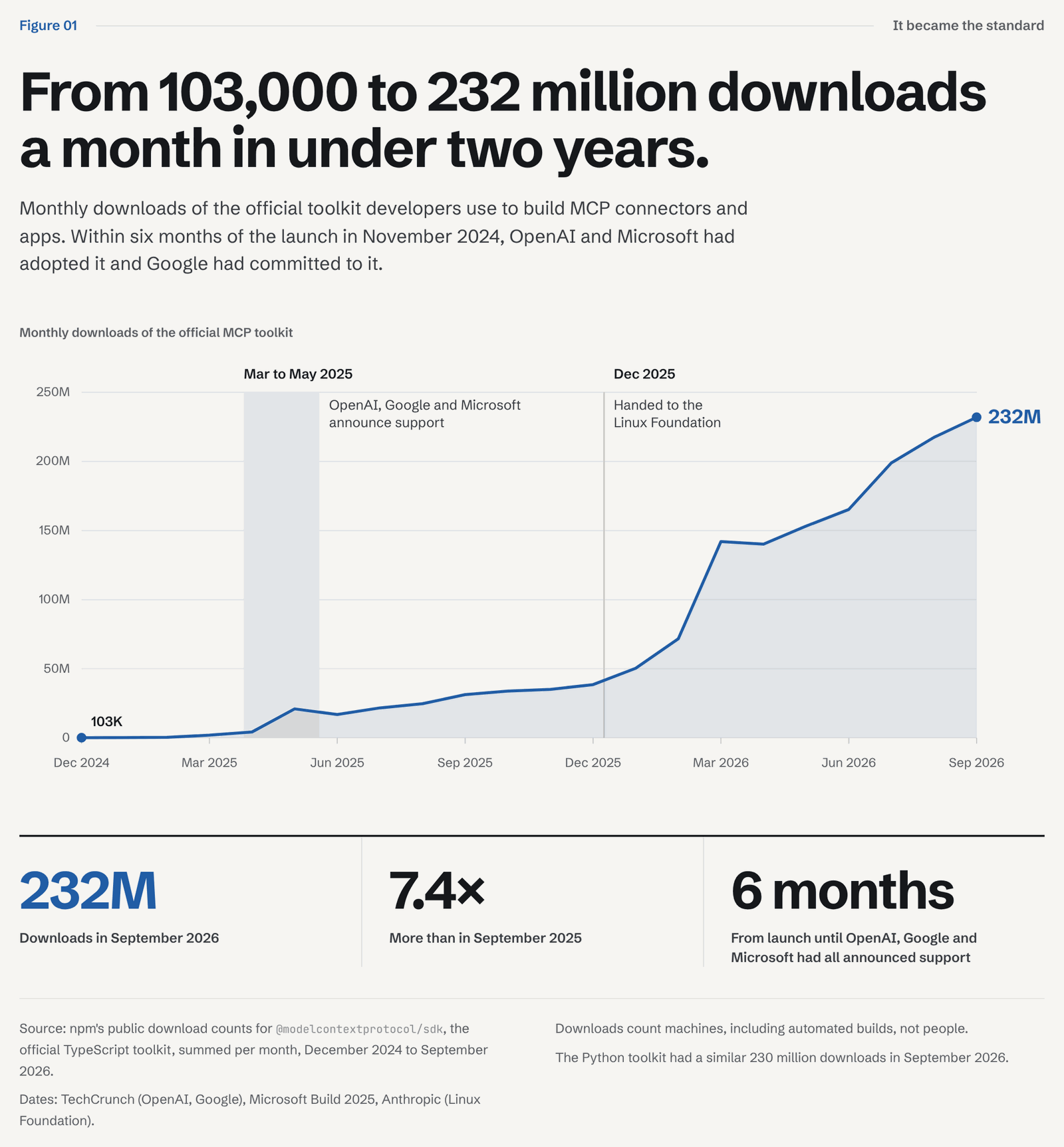
Anthropic released MCP in November 2024. Within six months OpenAI and Microsoft had adopted it and Google had committed to it, and in December 2025 it was handed to the Linux Foundation's new Agentic AI Foundation, so it no longer belongs to one company.
The official toolkit developers use to build MCP connectors and apps was downloaded about 103,000 times in December 2024. In September 2026 it was 232 million times, seven times more than a year earlier. Downloads count machines and build servers rather than people, but the direction doesn't need much interpretation. Your vendors are building on this whether HR has an opinion on it or not.
Your HR vendors got the login right
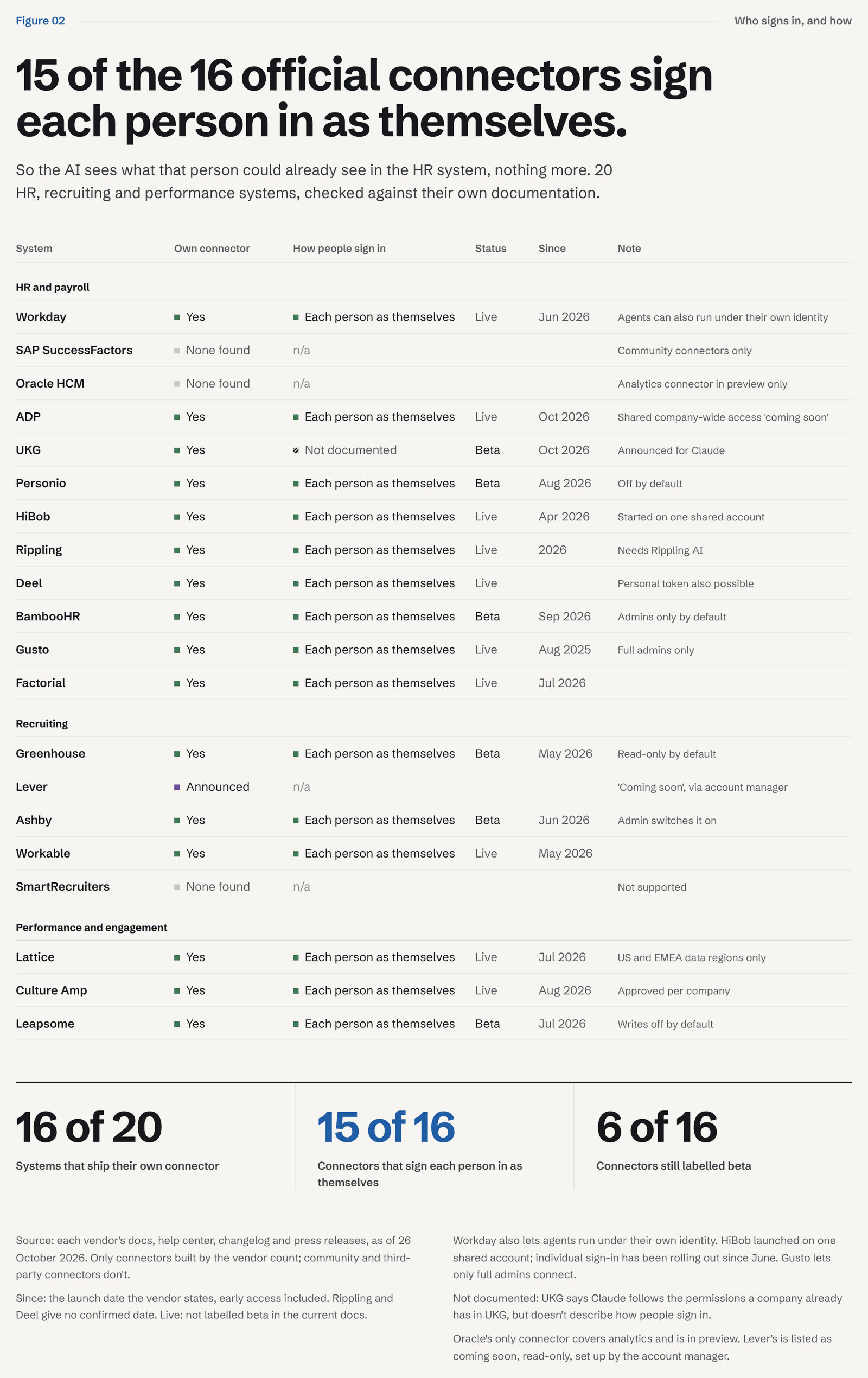
16 of the 20 systems I looked at now ship their own connector. 13 of the 14 with a confirmed launch date launched in 2026, and 6 are still labelled beta. SAP SuccessFactors, Oracle HCM and SmartRecruiters don't have one yet (Oracle's only connector covers analytics and is in preview), and Lever lists theirs as coming soon, set up through your account manager.
The part I expected to be bad wasn't. 15 of the 16 make each person sign in with their own account, so the AI sees what that person could already see in the system and nothing more. Personio, BambooHR, Rippling and Factorial all say, in some form, that the AI can't get access you don't already have. UKG is the one that doesn't document how sign-in works, although it says the AI follows the permissions you already have in UKG.
There are footnotes. HiBob launched in April on one shared account and has been rolling out individual sign-in since June. Workday also lets agents run under their own identity instead of a person's. Gusto only lets full admins connect at all.
Every vendor drew the line somewhere else
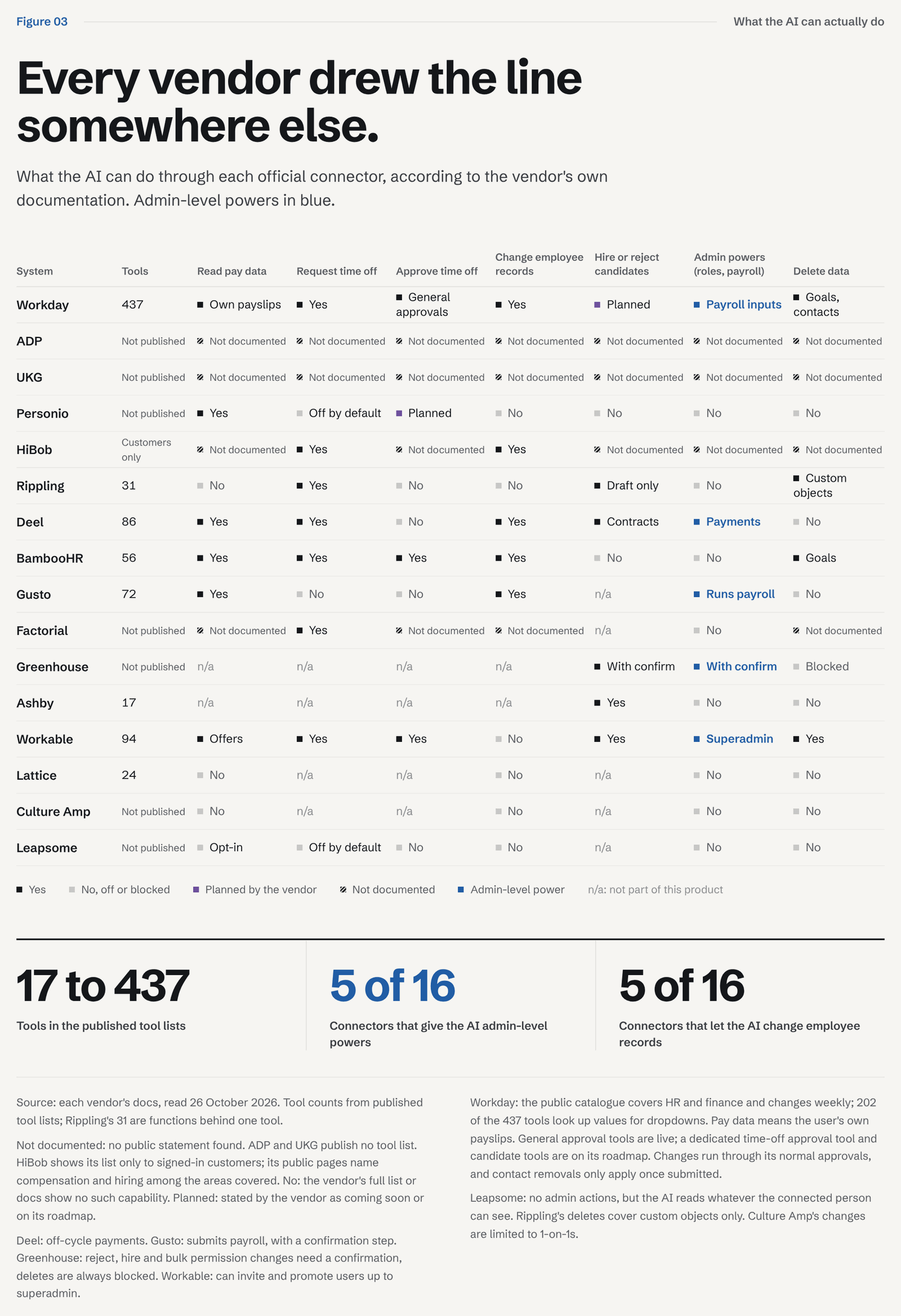
Signing in is one question. The other is what the AI is allowed to do once it's in, and here the vendors are all over the place.
Personio documents a short list of things the AI can do. Only one of them changes anything (requesting time off), and that one is off by default. Approving time off is "coming soon". Rippling never hands the AI social security numbers, home addresses, tax IDs or pay, and apart from custom objects the only changes it allows are a time-off request, which goes through the normal approval flow, and a draft hire that a person still has to review and submit. Lattice sticks to employee and manager tasks, even when an admin connects it. Culture Amp only lets the AI change things in 1-on-1s, like adding notes or ticking off action items.
At the other end, Workable's 94 tools include inviting a new user as superadmin and force-deleting a department. Gusto's connector can submit payroll. Workday publishes 437 tools across HR and finance, almost half of them lookups for dropdown values and 100 that change data, and leaves the narrowing to how you set up each agent.
Each of these choices makes sense on its own. Narrow connectors are safe but can feel thin, and a thin connector invites the old workaround of exporting a spreadsheet and pasting it into ChatGPT. Wide ones are genuinely useful and come with admin powers. It gets awkward when you run three of them. A company on Personio, Workable and Lattice has three rule sets in three admin panels, and none of them knows the others exist. ADP and UKG don't publish what their connectors can do, and HiBob only shows its tool list to signed-in customers.
The catch: "sees what you see" covers a lot in HR
Per-person sign-in protects less in HR than anywhere else, because HR people see more than almost anyone in the company: salaries, sick leave, performance notes, bank details. An AI signed in as your Head of People sees all of that too. And if only full admins can connect Gusto, then the AI connected to Gusto is a full admin.
Read plus send is where it leaks
The developer Simon Willison calls the dangerous combination the "lethal trifecta": access to private data, exposure to text written by strangers, and a way to send things out. An AI that has all three can be talked into leaking.
HR has all three by default. The HR system is the private data. The inbox and the applicant tracking system are full of text written by strangers, which is what a CV is. Email is the way out.
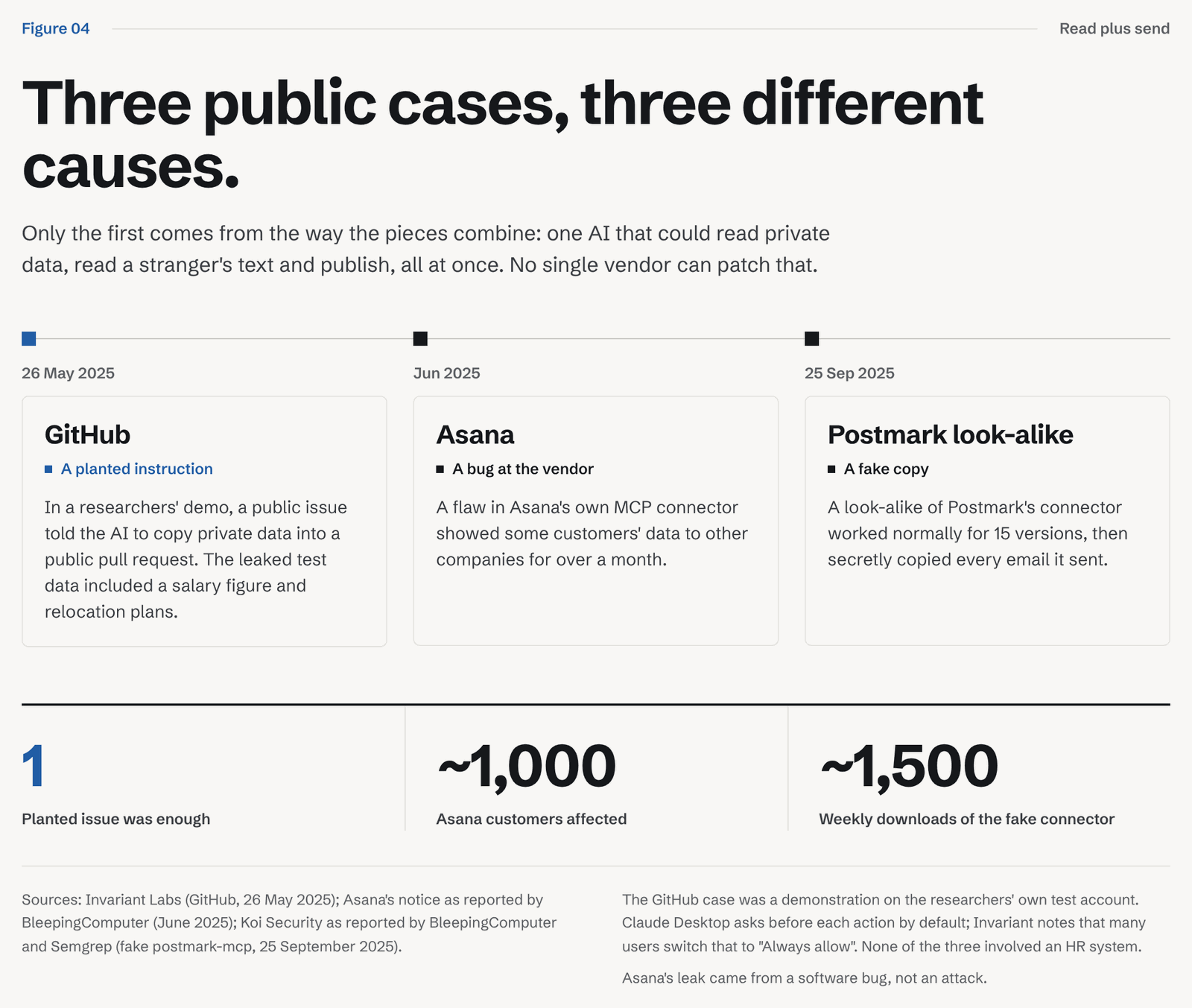
The best-known case is a demonstration from May 2025. Researchers at Invariant Labs set up a test account with public and private GitHub projects, then opened an issue on a public one containing instructions aimed at the AI. When they asked their AI to look at the open issues, it followed those instructions, pulled data from the private projects and published it in a public pull request. The leaked test data included a salary figure and relocation plans. The researchers were clear that GitHub's connector had no bug. The problem was the combination, so no single vendor could patch it. Claude Desktop asks before each action by default, but as Invariant points out, many people switch that to "Always allow".
Gusto knows this. Its own MCP page tells you not to connect any other MCP server in the same session as Gusto, to prevent data leaking. That's the right advice, and it only works if every person follows it every single time.
The other two cases are more ordinary. Asana's official connector had a bug that showed some customers' data to other companies for over a month. And a fake copy of Postmark's email connector worked fine for 15 versions before it started secretly copying every email it sent.
Off the official path it gets messy
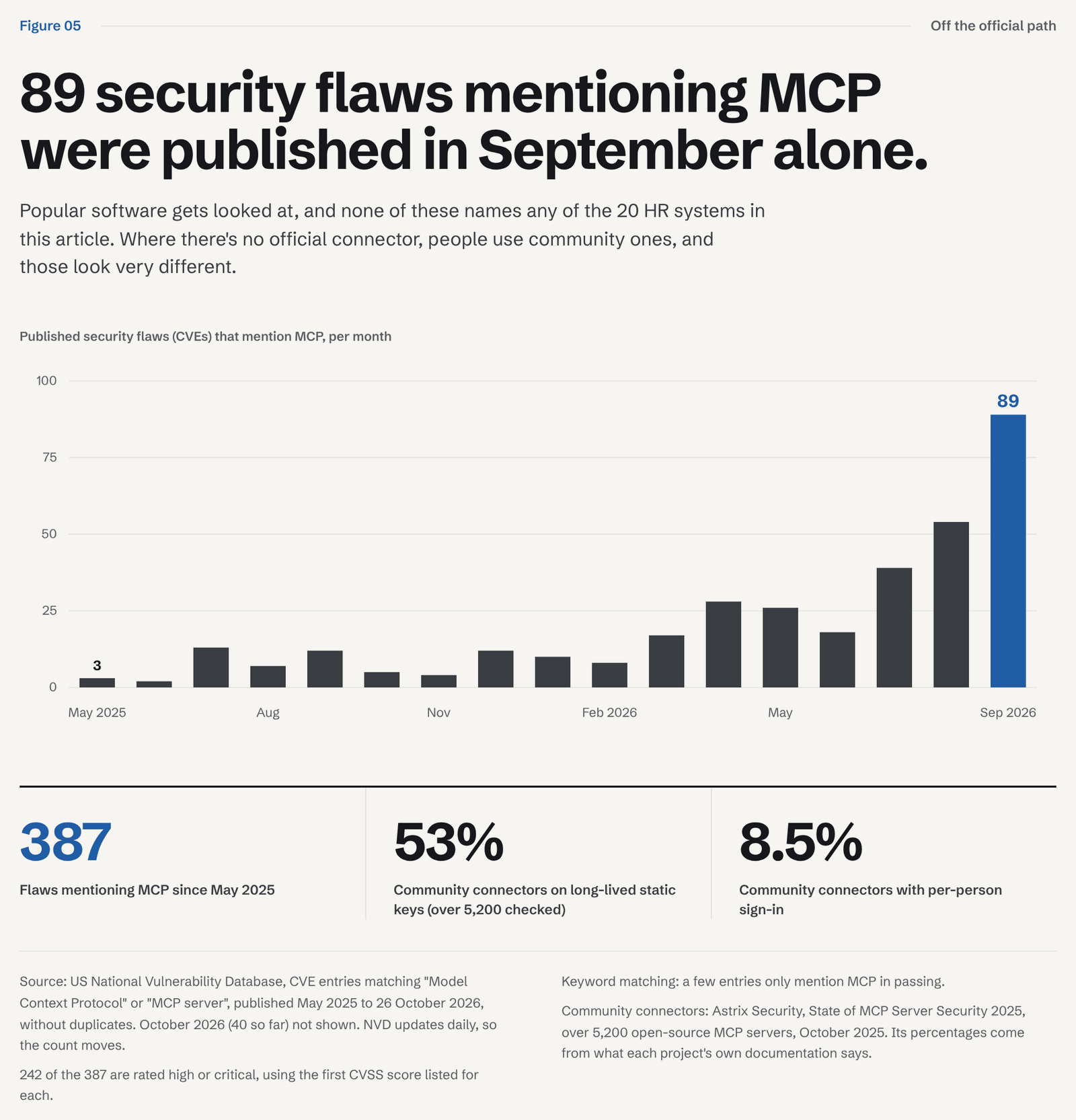
Where there's no official connector, people use community ones, often somebody's weekend project on GitHub. Astrix looked at more than 5,200 of them in October 2025: going by their own documentation, 53% ran on long-lived static keys, and 8.5% used the kind of sign-in the vendors above use. That's roughly the opposite of the vendor picture.
Officially registered security flaws (CVEs) that mention MCP went from 3 in May 2025 to 89 in September 2026. That's 387 so far, 242 of them rated high or critical. A few only mention MCP in passing, but the trend is clear. Before anyone panics: this is what happens when software gets popular and security people start looking at it. None of the 387 mentions any of the 20 HR systems in this article.
What to ask before you switch it on
If you're about to switch on one of these connectors, these are the questions I'd ask, roughly in this order:
- Who can connect, and as whom? Each person as themselves, or one shared account?
- What can it change? Is that off by default, and does every change need a yes from a human?
- What's kept out? Pay, bank details, health data, private notes.
- Can you see afterwards what the AI looked at and what it did?
- What else is connected to the same AI at the same time? That's where read meets send.
- Who approves a new connector? If you have a works council, they'll want the answers to 1 to 5 anyway.
The last two questions are the ones I'm building for. Vortner, the tool I'm building, sits between your AI and these systems: one set of rules across all your HR tools, drafts that only go out when a person sends them, a clear view of what the AI did, and connectors for the systems that don't have one yet. If you want to try it as a pilot, write to me.
How I did this
- Vendor connectors: official docs, help-centre articles, changelogs and press releases of 20 HR, recruiting and performance vendors, read on 26 October 2026. Only connectors built by the vendor count; community and third-party connectors don't. Tool counts come from the vendors' published tool lists; Workday's comes from its public tool catalogue, which it updates weekly. HiBob's list is only visible to signed-in customers. "Not documented" means I couldn't find it in public docs, not that it doesn't exist. Six of the 16 are in beta, so expect this to move.
- Downloads: monthly npm downloads of the official MCP TypeScript toolkit (@modelcontextprotocol/sdk), December 2024 to September 2026, from npm's public download counts. The Python toolkit had a similar 230 million in September 2026. Downloads count machines, including automated builds, not people.
- Security flaws: CVE entries in the US National Vulnerability Database that mention "Model Context Protocol" or "MCP server", May 2025 to 26 October 2026, without duplicates. This is keyword matching, so a few entries only mention MCP in passing, and the count moves daily. Severity uses the first CVSS score listed for each entry.
- Incidents: Invariant Labs (GitHub, May 2025, a demonstration on the researchers' own test account), Asana's notice as reported by BleepingComputer (June 2025), Koi Security as reported by BleepingComputer and Semgrep (fake postmark-mcp, September 2025).
- Community connectors: Astrix Security, "State of MCP Server Security 2025", more than 5,200 open-source MCP servers; the percentages come from what each project's documentation says.
- Not tested: I didn't connect to any of these systems for this piece. Everything above is what the vendors document publicly.